


Types of Computer Mouse: Introduction
Types of computer mouse classify input devices based on connection, sensor, and design characteristics. Understanding these classifications is essential for optimizing user workflows, whether for competitive gaming, long-term office productivity, or precision design work. A computer mouse serves as the primary bridge between human intent and digital execution, translating physical hand movements into exact on-screen cursor actions.
By analyzing the specific hardware components and design philosophies behind each type, users can drastically improve their computing efficiency and physical comfort. For more foundational knowledge, you can explore our comprehensive Computer Mouse Guide or learn about the mechanics of a Mouse Input Device.
Types of Computer Mouse Based on Connection Technology
Computer mouse types differ by connection method that determines signal transmission and latency performance. The way a mouse communicates with the host computer fundamentally alters its reliability, response time, and physical constraints. Broadly, these are categorized into wired and wireless protocols.
Wired Mouse Delivers Direct Signal Transmission
A wired mouse uses a USB interface that creates stable and uninterrupted data flow. By maintaining a physical cable tethered directly to the computer’s motherboard or USB hub, wired mice bypass the complexities of wireless communication, resulting in unmatched reliability.
USB Connection Establishes Continuous Power Supply
The USB interface directly delivers power to the mouse, which entirely eliminates battery dependency. Because the device draws electricity continuously from the computer, users never have to worry about recharging the device mid-task, replacing dead batteries, or experiencing performance drops as a battery depletes.
Signal Stability Creates Consistent Performance
A direct physical connection removes the risk of external signal interference, which ensures optimal accuracy. In environments crowded with wireless signals (like office buildings or gaming tournaments), a wired mouse is immune to dropped packets or frequency crossovers.
Latency Reduction Enhances Real-Time Response
The wired signal drastically reduces input delay, which inherently improves precision. High-end wired mice boast polling rates of 1000Hz to 8000Hz, meaning the mouse reports its position to the computer up to 8,000 times per second, effectively eliminating perceptible input lag.
Wired Mouse Use Cases Define Performance Needs
Competitive gaming and professional editing are environments that require absolute stability, which inherently favors a wired design. When a single missed pixel or a microsecond of lag can result in a lost match or a design error, the guaranteed signal integrity of a wired mouse makes it the professional’s top choice.
Wireless Mouse Uses Signal-Based Communication
A wireless mouse transmits data through RF or Bluetooth signals that enable cable-free interaction. This technology liberates the user from desk constraints, allowing for cleaner desk setups, remote presentations, and enhanced portability.
RF Receiver Enables Low-Latency Wireless Input
An RF (Radio Frequency) signal—typically operating on a 2.4GHz band—transmits data rapidly to a dedicated USB dongle, which creates a highly responsive control environment. Modern RF technology is so advanced that it practically mirrors wired speeds, making it ideal for gamers who want mobility without sacrificing performance.
Bluetooth Connectivity Expands Device Compatibility
The Bluetooth protocol directly connects devices without the need for a USB dongle, which increases flexibility. This is especially useful for users operating ultra-thin laptops, tablets, or multi-device setups, as a single Bluetooth mouse can often be paired to and toggled between several devices seamlessly.
Battery System Powers Wireless Operation
A dedicated battery module supplies energy to the sensor and transmitter, which supports full mobility. Depending on the model, this might feature built-in rechargeable lithium-ion batteries or rely on swappable AA/AAA batteries, with lifespans ranging from a few days of intense use to several years of standard office work.
Wireless Mouse Limitations Affect Performance Stability
Signal interference from routers, smartphones, or other peripherals can sometimes disrupt the connection, which reduces input accuracy. Additionally, wireless mice are slightly heavier due to the internal battery, and the reliance on external power means they must be charged or maintained regularly to avoid sudden disconnections.
Types of Computer Mouse Based on Sensor Technology
Sensor technology defines how a mouse detects movement and translates it into cursor motion. The underlying optical systems determine the types of surfaces the mouse can track on and the microscopic level of detail it can capture.
Optical Mouse Uses LED-Based Tracking
An optical mouse emits LED light that captures surface texture to generate movement data. It is the most common and universally adopted sensor technology in the modern computing landscape due to its reliability and cost-effectiveness.
LED Light Reflection Creates Surface Detection
The LED sensor captures the reflection of light bouncing off the desk or mousepad, which produces continuous motion data. A tiny camera (the CMOS sensor) takes thousands of pictures per second to calculate exact directional changes.
Surface Texture Influences Tracking Accuracy
The underlying surface pattern directly affects detection, which changes precision. Optical mice perform flawlessly on non-reflective, opaque surfaces like cloth mousepads, but they struggle to track properly on transparent glass or highly glossy tables.
Optical Sensor Stability Supports General Use
Standard tracking hardware maintains operational consistency, which ensures usability for almost all everyday computing tasks. Because they lack the hypersensitivity of laser mice, optical mice rarely suffer from “jitter” (unintended cursor shaking) when used on standard fabric pads.
Laser Mouse Enhances Precision Through Advanced Tracking
A laser mouse uses a focused beam that detects finer surface details for high-resolution tracking. By replacing the standard LED with an infrared laser diode, these mice capture a much higher degree of surface contrast.
Laser Beam Increases Surface Detection Depth
The laser sensor penetrates and captures micro details of the surface material, which improves overall tracking precision. It reads peaks and valleys in a surface that an LED would completely pass over.
High DPI Capability Enables Faster Cursor Movement
The high DPI (Dots Per Inch) inherent to laser sensors increases sensitivity, which enhances cursor speed. This is highly beneficial for users operating multi-monitor setups or massive 4K displays where vast screen real estate must be covered with minimal physical hand movement.
Laser Tracking Adapts to Multiple Surfaces
This advanced sensor reliably works on glossy surfaces and even clear glass, which expands usability for travelers or professionals working in dynamic, non-traditional environments.
Types of Computer Mouse Based on Design and Ergonomics
Mouse design shapes user interaction and determines comfort, control, and long-term usability. The physical shell of the mouse dictates how the hand rests, ultimately impacting joint health and fatigue levels over long periods.
Standard Mouse Uses Symmetrical Design for General Use
A standard mouse features a symmetrical shape that supports basic navigation tasks. These ambidextrous designs are versatile, cost-effective, and suitable for both left- and right-handed users. While they lack the contouring of specialized mice, their universal fit makes them the default choice for shared workstations and school computer labs.
Ergonomic Mouse Aligns Hand Position for Comfort
An ergonomic mouse positions the hand naturally to reduce strain and improve usability. Engineered around human anatomy, these mice aim to prevent Repetitive Strain Injuries (RSI), carpal tunnel syndrome, and tendinitis.
Vertical Design Reduces Wrist Rotation
The vertical shape of the mouse aligns the wrist in a “handshake” position, which minimizes pressure on the median nerve. Traditional mice force the forearm to twist flat, whereas vertical designs keep the arm in a neutral, stress-free state.
Wrist Support Enhances Long-Term Comfort
The ergonomic structure properly distributes the weight load of the hand, which prevents fatigue during prolonged use. Built-in thumb rests and sloped chassis ensure the fingers drape naturally over the buttons rather than gripping tightly.
Gaming Mouse Optimizes Performance for Competitive Use
A gaming mouse integrates high-performance components that enhance speed, accuracy, and responsiveness. They are built for extreme durability and precision.
Lightweight Design Improves Movement Speed
A reduced physical weight drastically increases user agility, which improves reaction times in fast-paced games. Many modern gaming mice feature “honeycomb” shells to shave off excess grams.
Programmable Buttons Expand Control Options
Custom buttons integrated into the side of the mouse trigger complex macro commands, which fundamentally enhance gameplay efficiency.
RGB Lighting Indicates Performance Profiles
An integrated RGB system visually displays active DPI modes or customized profiles, which improves usability by giving the user instant visual feedback on their current hardware settings.
Vertical Mouse Creates Natural Hand Alignment
A vertical mouse rotates hand positioning to create a more natural ergonomic posture. While technically a sub-category of ergonomic mice, the true vertical mouse stands completely upright. It fundamentally changes how users click, relying on arm movement rather than wrist pivoting, offering maximum relief for chronic wrist pain sufferers.
Types of Computer Mouse Based on Use Case
Mouse types align with specific tasks that define performance requirements and user expectations. Buying a mouse tailored to your specific workflow yields much better results than purchasing a generic device.
Gaming Mouse Types Support Fast and Accurate Input
Gaming mouse types prioritize precision and speed for competitive environments. They are categorized further based on the genre of games they are designed to support.
FPS Mouse Focuses on Precision Tracking
Designed with low DPI thresholds and maximum physical control, an FPS (First Person Shooter) mouse improves aim and increases shot accuracy. They usually feature fewer buttons (to avoid misclicks) and a lightweight frame.
MMO Mouse Increases Button Availability
Equipped with massive thumb-grids featuring 12 or more programmable buttons, an MMO (Massively Multiplayer Online) mouse expands control inputs, which vastly improves in-game efficiency for casting complex spells and abilities.
Office Mouse Types Optimize Productivity
Office mouse types focus on comfort and efficiency for daily tasks. They often feature infinite-scroll wheels for navigating massive spreadsheets, quiet-click buttons to maintain office tranquility, and multi-device Bluetooth switching to jump between laptops and workstations.
Travel Mouse Types Prioritize Portability
Travel mouse types use compact design to support mobile usage. They are intentionally small, flat, and lightweight. Many feature retractable cables or USB-C charging, allowing digital nomads and traveling executives to slip them into thin laptop sleeves with ease.
Design Mouse Types Enhance Creative Precision
Design-focused mouse types deliver high accuracy for editing and creative work. Used heavily by graphic designers, architects, and video editors, these mice often feature specialized side-scroll wheels for timeline navigation, dedicated gesture buttons, and ultra-precise laser sensors for pixel-perfect photo editing.
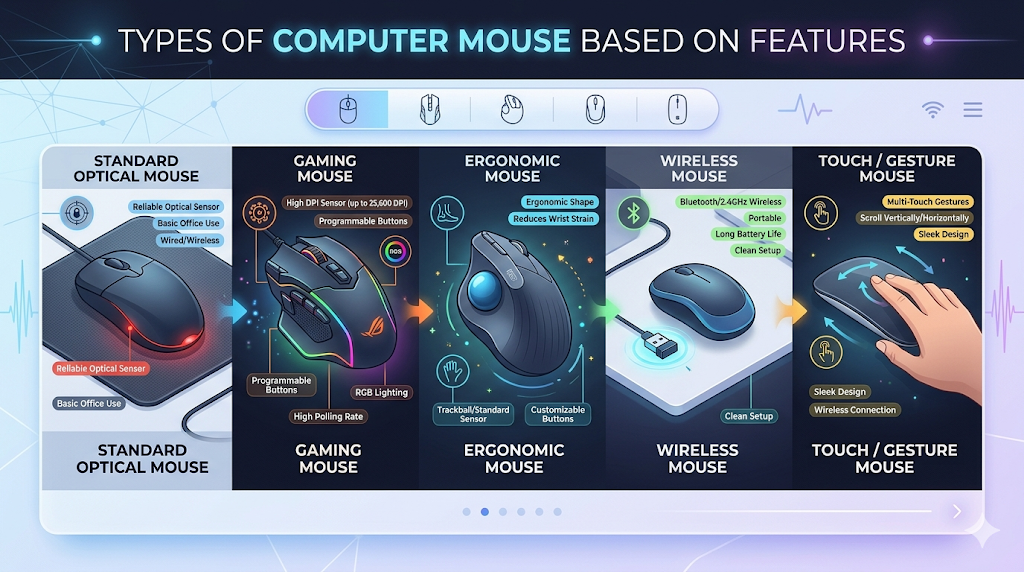
Types of Computer Mouse Based on Features
Mouse features define interaction capabilities and influence overall performance. Beyond the sensor and shell, the specific mechanical additions to a mouse determine its utility.
DPI Control Defines Cursor Sensitivity
DPI control adjusts cursor speed based on physical movement sensitivity. A dedicated DPI toggle button allows users to switch from high sensitivity (fast cursor movement for general browsing) to low sensitivity (slow, deliberate cursor movement for precise photo cropping or gaming sniping) on the fly.
Scroll Wheel Enhances Navigation Efficiency
Scroll wheel mechanisms convert physical rotation into vertical on-screen movement. Advanced features include tilt-scrolling (pushing the wheel left or right for horizontal scrolling) and “hyper-fast” free-spinning modes for navigating thousand-page documents in seconds.
Programmable Buttons Expand Functional Control
Programmable buttons assign custom software commands to improve workflow efficiency. Whether it’s mapping a button to “Copy/Paste,” assigning a complex Photoshop macro, or mapping an inventory key in a game, programmable inputs save immense amounts of time.
Comparison of Different Types of Computer Mouse
Mouse type comparison reveals differences in performance, usability, and application. Understanding these direct match-ups helps consumers make informed purchasing decisions.
Wired vs Wireless Performance Comparison
| Feature | Wired Mouse | Wireless Mouse (RF/Bluetooth) |
| Latency | Virtually zero (1ms or less) | Low on RF; Noticeable on Bluetooth |
| Power Source | Powered by host PC (USB) | Internal Battery / AA Batteries |
| Mobility | Restricted by cable length | High mobility, no desk clutter |
| Weight | Generally lighter | Slightly heavier due to battery |
Optical vs Laser Accuracy Comparison
| Feature | Optical Mouse | Laser Mouse |
| Sensor Type | LED Light | Infrared Laser Beam |
| Surface Compatibility | Needs opaque surfaces (cloth/wood) | Works on almost all surfaces (including glass) |
| Jitter/Acceleration | Low (More accurate 1:1 tracking) | Moderate (Can be overly sensitive) |
| Best Use Case | Gaming, Standard Office | Travel, Dynamic work surfaces |
Ergonomic vs Standard Comfort Comparison
| Feature | Ergonomic Mouse | Standard Mouse |
| Hand Posture | Neutral, handshake position | Flat, pronated wrist |
| Learning Curve | High (Requires adaptation) | None (Universally familiar) |
| Ambidextrous | Rarely (Must buy Left/Right specific) | Frequently (Symmetrical designs) |
| Medical Benefit | Reduces strain and RSI risk | Offers no medical/posture benefits |
Advantages and Limitations of Each Mouse Type
Each mouse type introduces specific benefits and limitations that affect usability.
- Wired Mice: Offer the supreme advantage of unlimited power and zero latency. However, their primary limitation is cable drag, which can snag on desk edges and clutter a minimalist workspace.
- Wireless Mice: Provide the ultimate aesthetic and physical freedom. Conversely, they introduce the limitation of battery management and the slight, but ever-present, risk of signal interference.
- Ergonomic Mice: Champion long-term health and pain prevention. Yet, their limitations include a steep learning curve, bulkier frames that are hard to travel with, and general unsuitability for fast-paced, twitch-reaction gaming.